Purpose:
To explain how users can submit a Delay Reason when starting a delayed activity in livSYT.
Step-by-Step Instructions:
1) Start the delayed activity
- When you start an activity that is already delayed, a pop-up will appear asking for details.
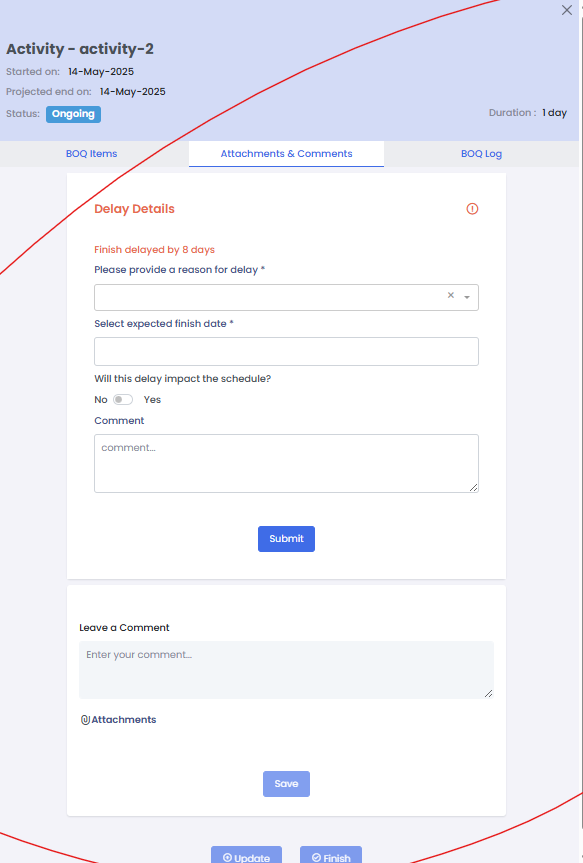
2) Enter delay details
- Type the Delay Reason.
- Enter the Expected Finish Date.
3) Fill other fields
- Complete any other required information shown in the pop-up.
4) Submit the delay form
- Click Submit to save the delay reason.
Tips & Best Practices:
- Always provide a clear and specific delay reason for better tracking.
- Enter an accurate expected finish date to help with planning.
- Make sure all required fields are filled before submitting.
- Inform your project team if the delay impacts other activities.
- For any issues, contact LivSYT Support.
Related Resources:
How do I start or finish an activity?
How to sort/filter activities in Kanban view?
Was this article helpful?
That’s Great!
Thank you for your feedback
Sorry! We couldn't be helpful
Thank you for your feedback
Feedback sent
We appreciate your effort and will try to fix the article